Field service software

For HVAC shops with one to six trucks. $70 a month, every feature included.

The tech's day on their phone, dispatch and billing in the office, a pay link on the customer's phone. Hosted and set up for you, nothing to install.

No signup. Make up a shop and poke around. It resets every so often.

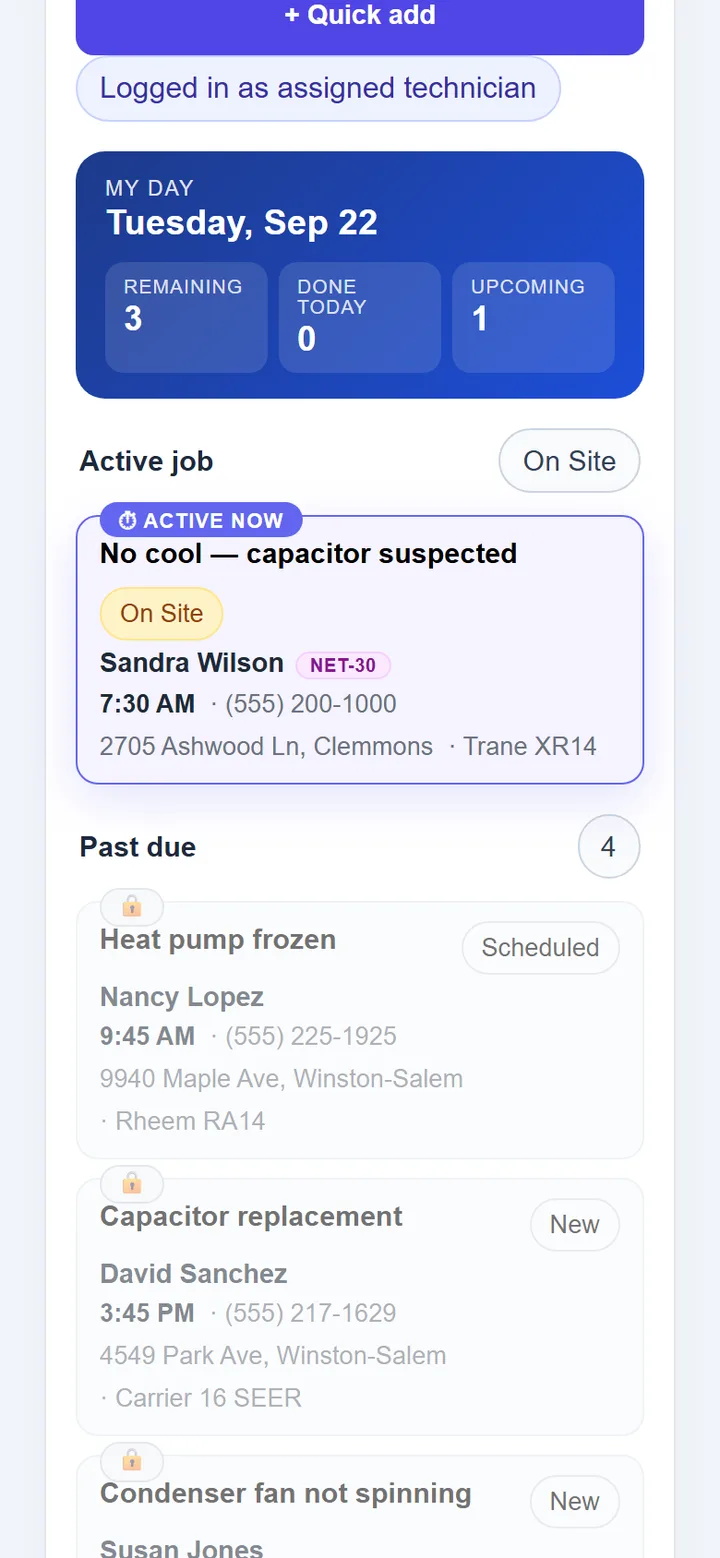
Technician's phone: My day card for Tuesday, Sep 22 showing 3 remaining, 0 done, 1 upcoming; the active job, No cool — capacitor suspected, marked On Site and pinned on top; a Past due list of 4 below.
The tech's day, on the tech's phone.
  • Nothing to installRuns in the browser on any phone, tablet or PC. Add it to the home screen like an app.
  • Hosted and set up for youEach shop runs isolated with its own database. Backed up nightly, on and off the server.
  • Your customers come with youImport the customer list from a CSV on day one.
  • Your own Stripe and TwilioCard payments and texting run on accounts you own.

Who it's for

Owner-operated HVAC shops. Roughly one to six trucks.

One to six trucks

Enough jobs to need a board, a map and a queue. Not enough to hire a dispatcher, or to pay for software priced like you had one.

The owner is in a truck

You run calls and run the shop. The phone side is built for that. The office side (the board and the Needs attention queue) is on the same phone when you're parked.

The office is one person

Or a spouse, or you after dinner. One queue of what needs doing today instead of a stack of tickets and a notebook.

If you run twenty trucks and a dispatch department, this isn't built for you. That's on purpose.

A day with Onyx

Built from the technician's side first, so the day starts in the truck. Then the office, the customer, and the end of the month.

7:30 AM In the truck

Techs open their day, not a clipboard.

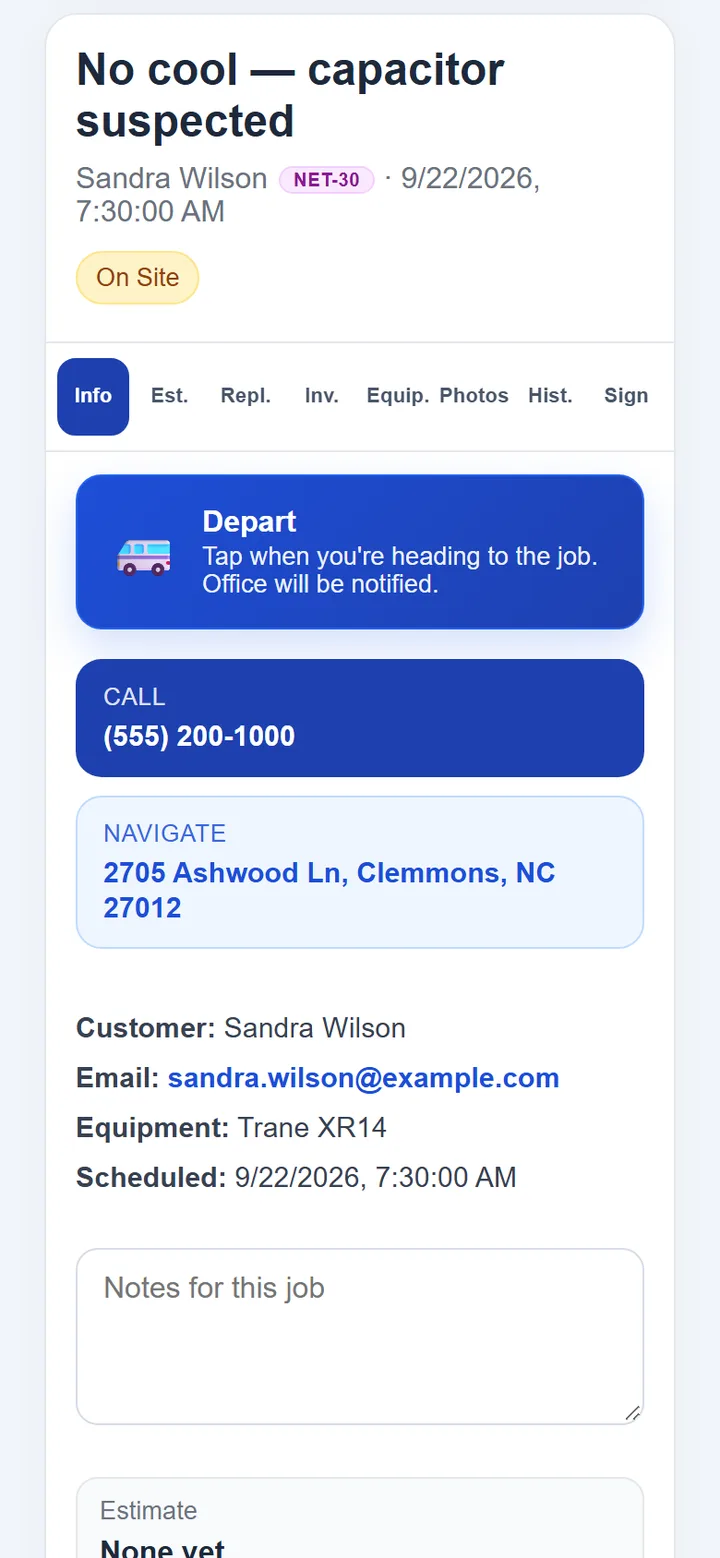
My day shows what's left, what's done and what's coming, with the active job pinned on top. One tap on Depart and the office sees the tech en route. Tapping I've arrived does the same on arrival. Before leaving, the invoice comes off the pricebook with tax worked out from the address. The customer signs on the phone. The tech collects at the door by cash, check or a card pay link.

Also on the phone
  • Call the customer, navigate
  • Photos and notes
  • Equipment on file, history at the address
  • Estimates and replacement quotes
  • Deposits and partial payments
  • Maintenance plan signup
  • Parts on the truck
  • Time clock with meal breaks
  • Claim an after-hours call
Job detail on the technician's phone: the job title, customer and On Site status, tabs for estimate, replacement, invoice, equipment, photos, history and signature, and large Depart, Call and Navigate buttons.
Tap Depart and the office is notified live.
11:40 AM At the office

The office works one queue.

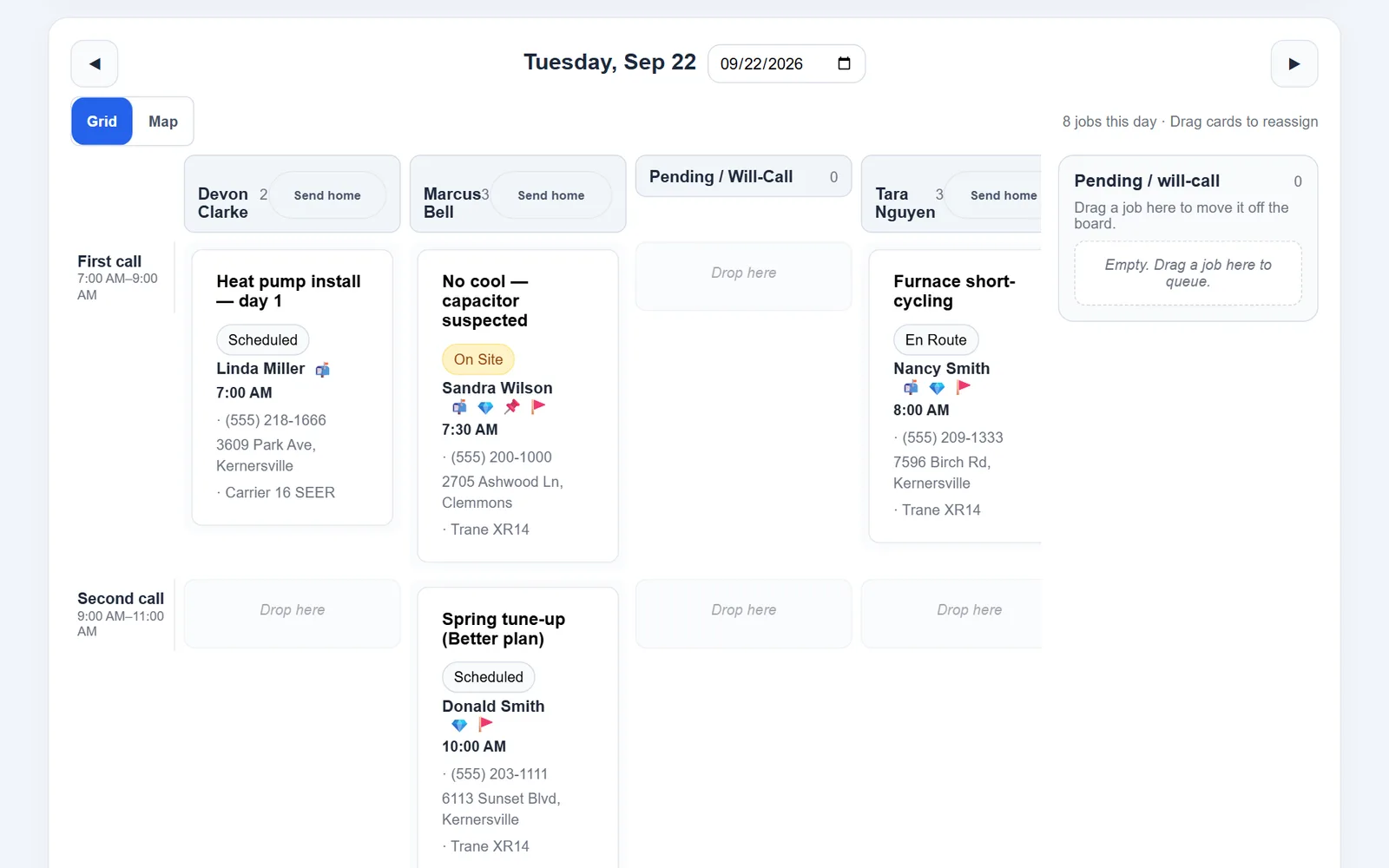
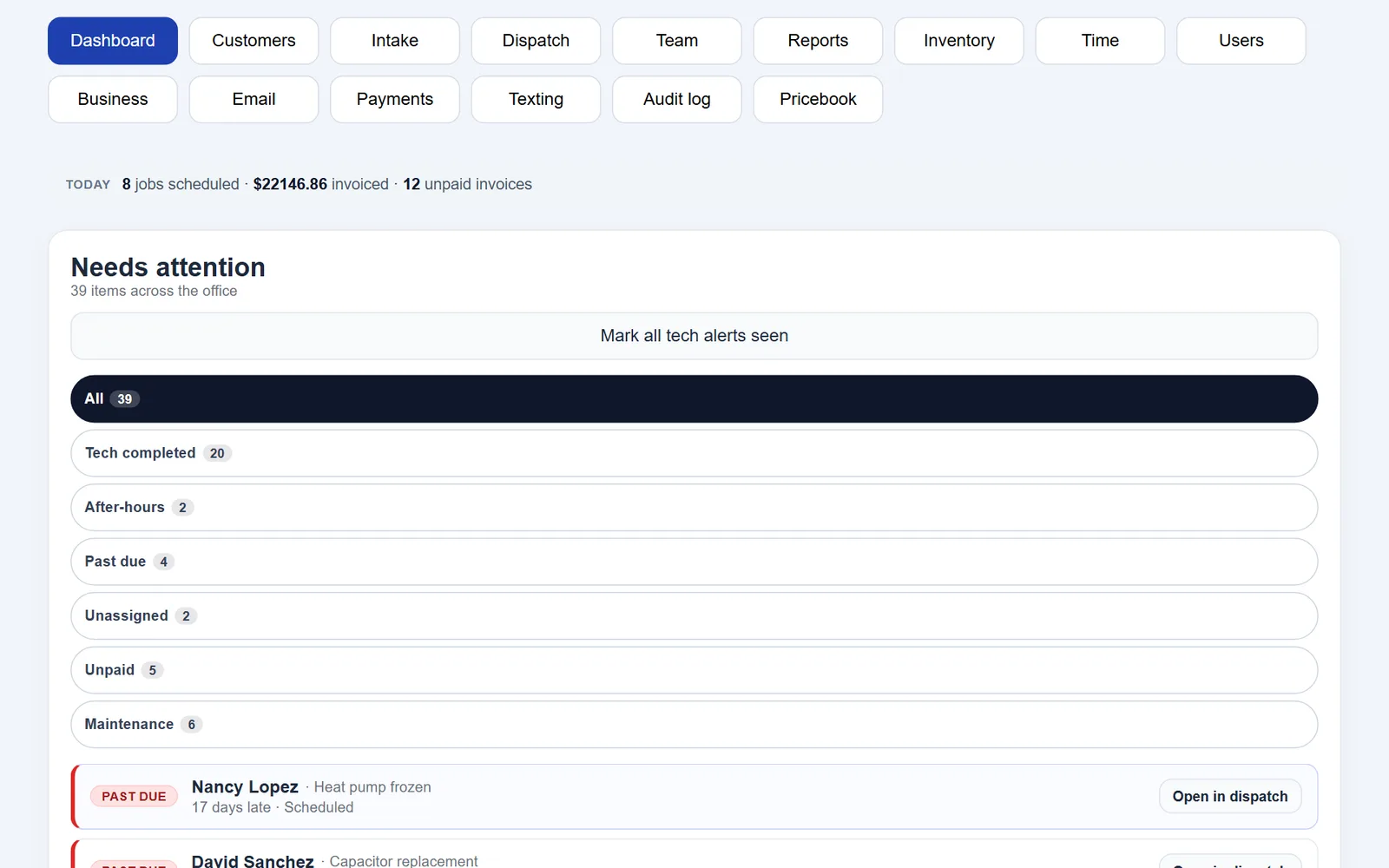
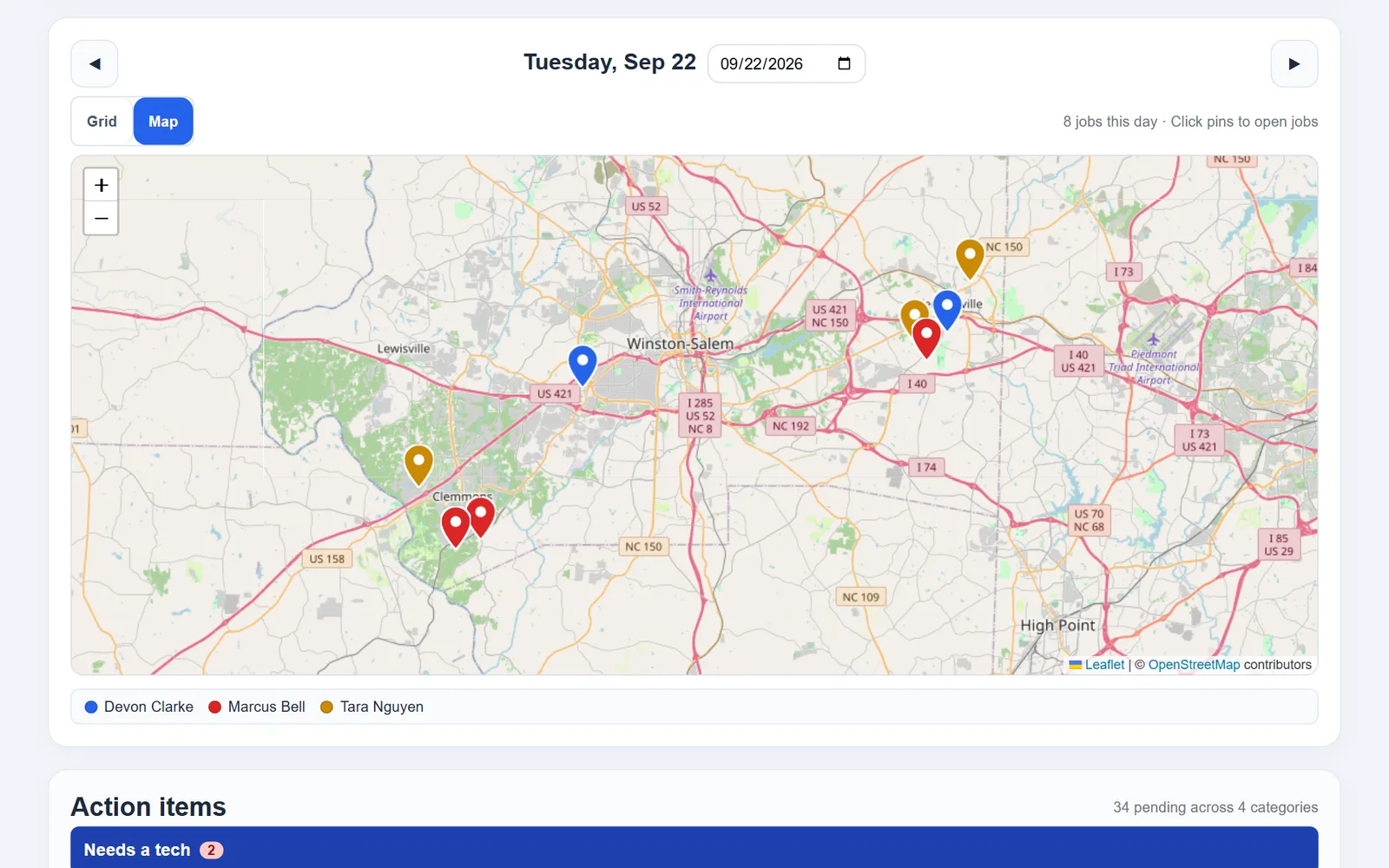
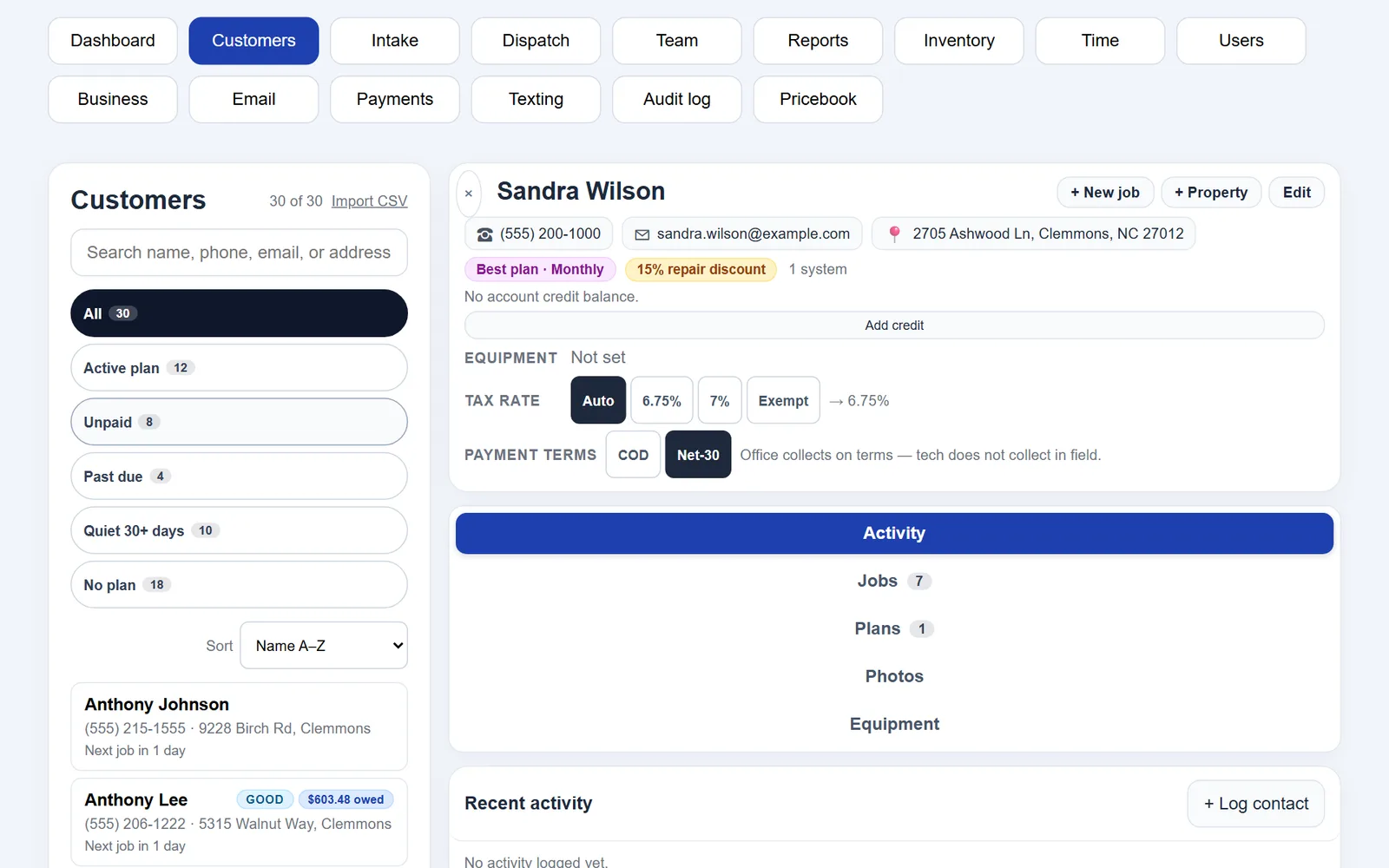
The dashboard opens on Needs attention: tech alerts, past due, unassigned, unpaid, maintenance due. A new call comes in through intake and gets dragged onto a tech and a call slot on the board. The board shows where everyone is (idle, en route or on site), updated every minute. The map shows the day's jobs as pins, colored per tech. Each customer file holds their properties, equipment, plan, tax rate and terms, so a Net-30 customer's invoice already knows it's Net-30.

Also at the desk
  • Intake of new calls
  • Customers and properties
  • Contact log
  • Pricebook
  • Inventory and purchase orders
  • Team, users and roles
  • Audit log
  • Hours, dispatch slots, plan tiers, tax by ZIP
Dispatch board for Tuesday, Sep 22: three technician columns with jobs in First call and Second call slots, one job On Site, one En Route, and an empty Pending / will-call queue on the right.
Dispatch board. Three techs, one on site, one en route. Drag a card to reassign it. The Map tab shows the same day as pins.
6:05 PM The customer's phone

The customer gets a link, not a login.

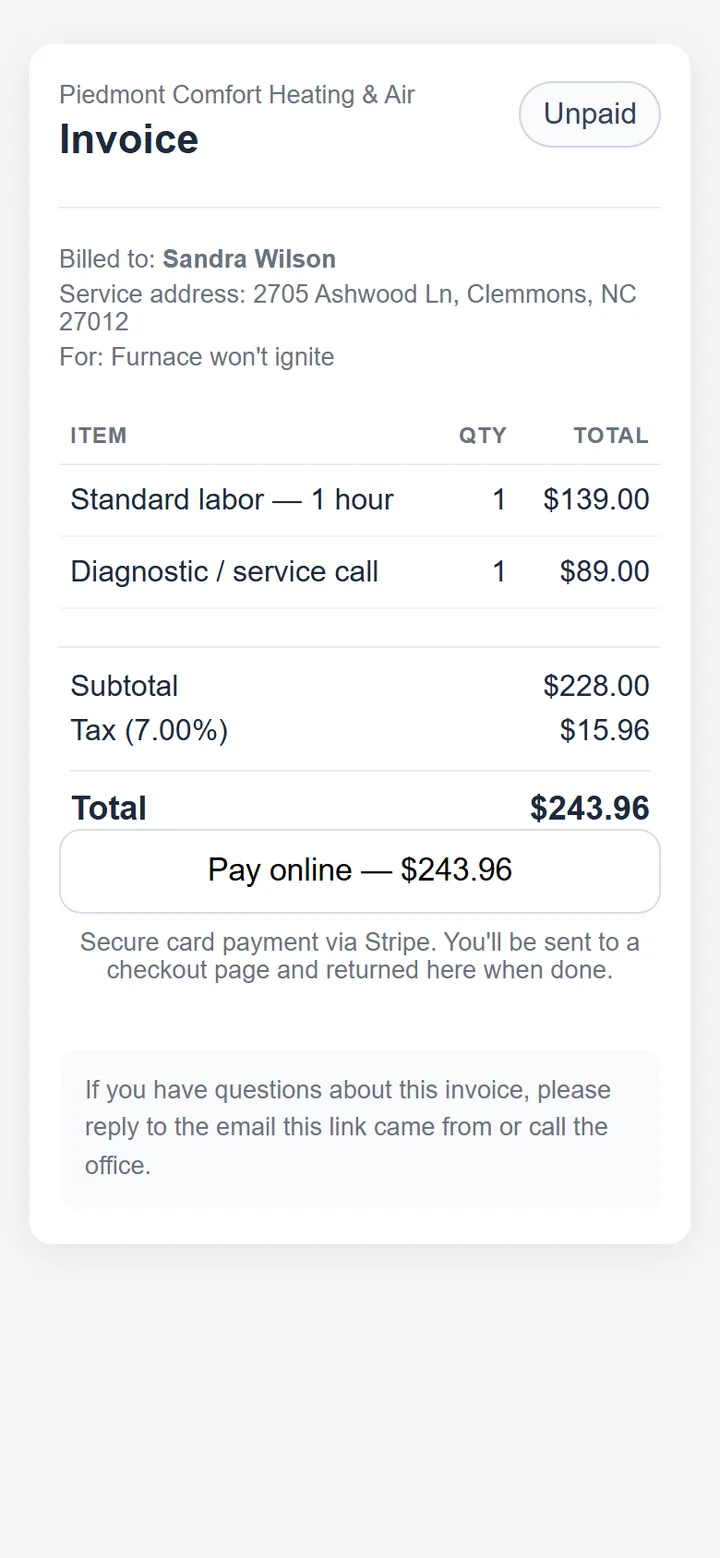
The invoice arrives by email with a link. It opens on their phone as a clean page: what was done, the tax, the total, and one Pay online button. The card goes through your Stripe account, and when they land back on the page the invoice reads Paid. Once your Twilio number is registered, texts go out from it too: a booking confirmation, a reminder the day before, "your tech is on the way" when the tech taps Depart, and a review request when the office sends one.

What customers get
  • Estimates and invoices by email
  • Pay online by card
  • Invoice link by text
  • No account, nothing to install
Customer's phone: an unpaid invoice from Piedmont Comfort Heating & Air with two line items, tax, a $243.96 total and a Pay online button.
What the customer sees. Just the link, nothing to sign up for.
Month end Closing the books

Who owes what, and what you owe the state.

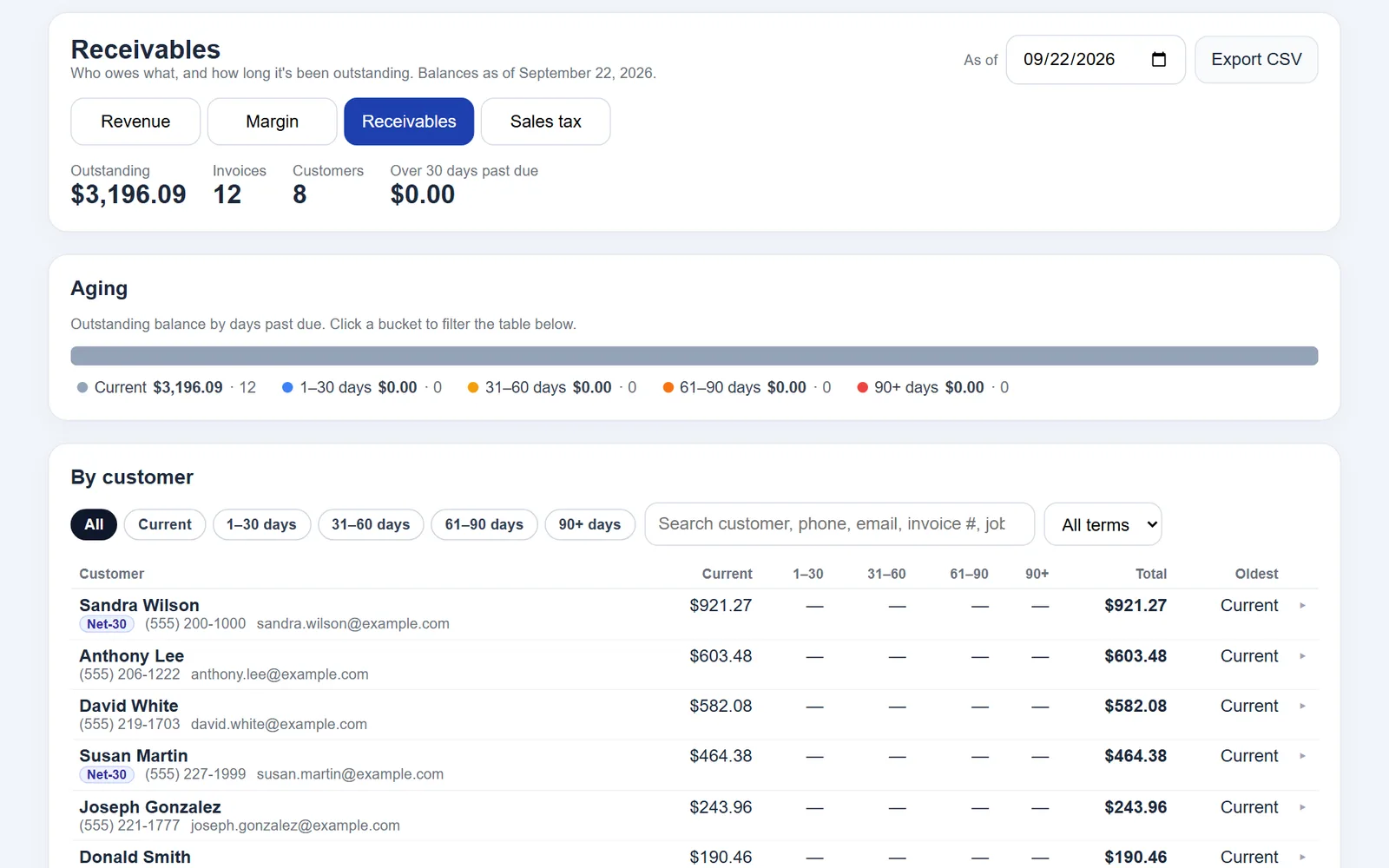
Receivables aging shows every open invoice by days past due, and you can email or text the pay link straight from the report. Sales tax gives you taxable sales and tax collected for the filing period, by rate and by county, with a CSV for the return. Revenue and margin by tech and job type are one tab over.

Also in reports
  • Revenue and margin by tech
  • Revenue and margin by job type
  • Sales tax by rate and county, CSV
  • Payroll hours export, CSV
Receivables report: outstanding balance, an aging bar by days past due, and a by-customer table with Current, 1–30, 31–60, 61–90 and 90+ columns and an Export CSV button.
Receivables aging. Who owes what, by days past due. Email or text the pay link from here, or export the CSV.

What's included

This is the whole list.

On the truck

  • My day: remaining, done, upcoming. Active job pinned on top. Past-due and will-call queues.
  • Claim unassigned after-hours calls.
  • Depart and I've arrived, office notified live. Call the customer. Navigate.
  • Job photos, notes, equipment on file (make, model), job history at that address.
  • Estimates and replacement quotes with multiple options the customer can approve.
  • Invoices from the pricebook, tax worked out from the address, customer signature.
  • Collect at the door: cash, check, or a Stripe card link to open, copy, or text. Deposits and partial payments.
  • Maintenance plan signup on site: Good / Better / Best tiers with repair discounts.
  • Parts on the truck. Time clock with meal breaks.

In the office

  • Needs attention queue: tech alerts, past due, unassigned, unpaid, maintenance due.
  • Dispatch board: drag jobs between techs and call slots. Map view with pins. Idle, en route, on site, updated every minute.
  • Customers: multiple properties, equipment, plans, contact log, CSV import.
  • Per-customer tax rate and COD or Net-30 terms.
  • Intake of new calls. Team. Pricebook. Inventory and purchase orders.
  • Users and roles. Audit log.
  • Business settings: hours, dispatch slots, plan tiers, tax by ZIP.
  • Time clock and payroll hours export (CSV).

For the customer

  • Emailed estimates and invoices with a link to view and pay online (card via Stripe).
  • A clean invoice page on their phone with a Pay online button.
  • Texts through your own Twilio number: booking confirmation, day-before reminder, tech on the way, review request, invoice link.

Reports

  • Revenue and margin by tech and by job type.
  • Receivables aging: who owes what, by days past due. Email or text the pay link from the report.
  • Sales tax: taxable sales and tax collected for a filing period, by rate and by county. CSV.

A few more of the office screens

Office dashboard: today's totals, then a Needs attention queue of 39 items filtered by Tech completed, After-hours, Past due, Unassigned, Unpaid and Maintenance, with a past-due job and an Open in dispatch button.
Dashboard. The Needs attention queue: tech alerts, past due, unassigned, unpaid, maintenance due. Past-due and unassigned rows open straight on the board.
Dispatch map view: the day's jobs as pins on a street map, colored per technician.
Dispatch map. The day's jobs as pins, colored per tech.
Customer record: properties, equipment, maintenance plan, tax rate, Net-30 terms and an activity log.
Customer record. Properties, equipment, plan, tax rate, Net-30 terms, activity.

Pricing

One price. Nothing on this page is an add-on.

$70a month, per shop

Every feature included. Hosted and set up for you.

No signup. Make up a shop and poke around. It resets every so often.

  • Everything on this page.
  • Hosting, setup, and daily backups.
  • Your shop runs isolated with its own database.
  • Your customer list imported from a CSV.
  • Works on any phone, tablet or PC. Nothing to install.
  • Stripe and Twilio are your own accounts; their standard fees apply.

Your data

It's yours. Here's how it's kept, and how you get it back.

Your own database

Each shop runs as its own service with its own database. Nothing is pooled with other shops, and no other shop's login can reach yours.

Backed up every night, on and off the server

Every night the database and every photo are archived, and the last 30 archives are kept on the server. The same night a copy of each archive goes to a second provider, Backblaze, where it is stored encrypted, in case the server itself is lost.

Card numbers never touch Onyx

Customers type their card on Stripe's own payment page. Onyx never sees or stores a card number, so there is none to lose.

Locked down

Your shop is served over HTTPS. The server takes no web traffic except through an encrypted tunnel; the only other way in is our own SSH login. Passwords are stored hashed, and your Stripe, email and Twilio keys are encrypted at rest. An audit log records who changed what.

You can take it with you

Ask any time and you get a complete copy of your shop: the database and every photo. Receivables, sales tax, payroll hours and the audit log export to CSV whenever you like.

If you cancel

You get that complete copy on the way out. Thirty days later your shop and its backups are deleted, off-site copies included.

Project Onyx can reach your shop's server to run it and to help you. That's the only reason we touch it. Your data isn't sold, shared or used for anything else.

Why I built it

I'm an HVAC tech. When my license comes through I'm opening my own shop, and I'm not going to run it on paper. I'm also not going to pay a big software company so much every month that I'd have to cut into my customers' wallets to cover it.

So I built the tool I want to run my shop on, from the technician's side first: the phone part had to be right before anything else. It's $70 a month because that's what I think is fair for everything in it. What's on this page is what I'll be using in my own trucks. Try the demo. If it's the right size for your shop, you'll know in ten minutes.

— Founder, Project Onyx

FAQ

The short answers.

Do I need Stripe?

Only if you want customers to pay by card, at the door or online. Cash and check work without it. Stripe is your own account, so the money goes from your customer to your bank; nothing is billed through Onyx.

Do I need Twilio?

Only for texting. Booking confirmations, day-before reminders, "on the way" texts, review requests and invoice links go out through your own Twilio number once that number is registered. Registration takes a while, so plan on texting coming online after you're set up, not on the first day. Emailed estimates and invoices don't need it.

Does it work on my techs' phones?

Yes. It runs in the browser on any phone, tablet or PC and can be added to the home screen like an app. Nothing to install from an app store.

How do my customers get in?

They don't log in. Estimates and invoices go out by email with a link to view and pay online. The invoice page has a Pay online button. Once texting is set up, the same link goes out by text too.

Where does my data live? Is it backed up?

Project Onyx hosts it on a server in the United States. Each shop runs isolated with its own database. It's backed up every night, with a copy sent to a second provider the same night, where it's stored encrypted. Your customer list can be imported from a CSV when you start. See Your data.

What happens in the demo?

It opens on a setup wizard: shop name, your name, an email address, a password. No signup. Make up a shop and poke around: take a call, put it on the board, work it from the tech view, invoice it. The demo is wiped every so often, so don't put real customers in it.

What if I cancel?

You get a complete copy of your shop, the database and every photo, and thirty days later it's deleted on our side, backups and off-site copies included. Nothing is held hostage.

What does it cost, really?

$70 a month, per shop, every feature included, hosted and set up for you. Stripe and Twilio are your own accounts; Stripe's standard processing fees and Twilio's messaging fees apply.